1. 엔비디아 드라이버 설치
https://www.nvidia.com/Download/index.aspx?lang=kr#
Download the latest official NVIDIA drivers
Download the latest official NVIDIA drivers
www.nvidia.com
2. cuda toolkit 설치
https://developer.nvidia.com/cuda-toolkit-archive
CUDA Toolkit Archive
Previous releases of the CUDA Toolkit, GPU Computing SDK, documentation and developer drivers can be found using the links below. Please select the release you want from the list below, and be sure to check www.nvidia.com/drivers for more recent production
developer.nvidia.com
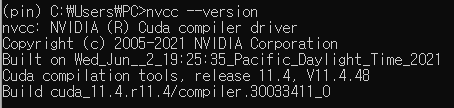
- GPU의 cuda 버전과 동일한 toolkit이 필요합니다.
- nvcc --version 을 통해 cuda runtime version을 확인할 수 있습니다.
- cuda runtime version과 동일한 toolkit을 설치합니다.
3. nvidia cuDNN 덮덮
https://developer.nvidia.com/rdp/cudnn-download
- C:\Program Files\NVIDIA GPU Computing Toolkit\CUDA\v11.4
- 위 경로에 cuDNN 내용을 덮어쓰기 합니다.
4. 환경 변수 설정
- Path에 추가합니다

GPU 환경설정은 꽤나 번거롭고 자칫 빡이 칠 수 있습니다.